
Deepgram Flux, the new conversational speech-to-text model, is now available on Bolna. Here is what it does, how it handles turn-taking, and when it makes sense to use.
If you have spent any time building voice agents, you already know that the hardest part is rarely the words. It is the timing.
Knowing when the caller is actually done speaking, knowing when to jump in, knowing when to wait a beat longer because they are just thinking, these are the small moments that decide whether a conversation feels natural or off. Most voice AI stacks handle this by stitching together a few different systems: a transcriber for the words, a voice activity detector for the silences, and an endpointing layer to make the call on whether the turn is finished. It works, but it has rough edges.
Deepgram Flux is a new approach to this problem, and it is now available as a transcriber option on Bolna.
What Deepgram Flux Actually Does
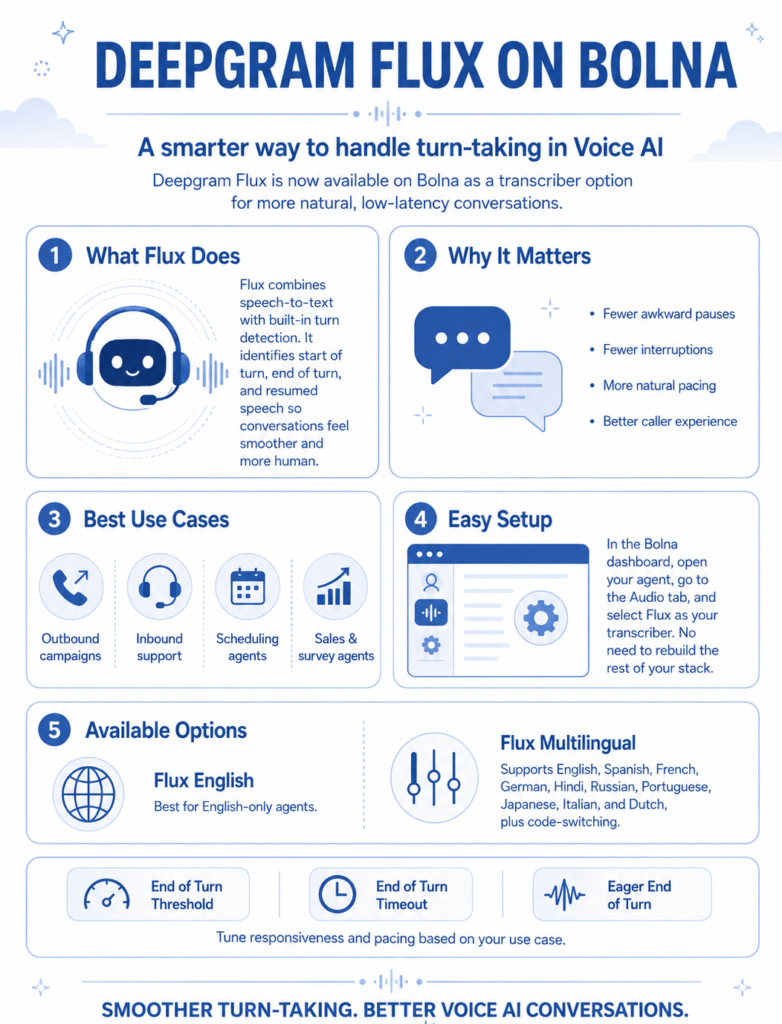
Flux is Deepgram’s first speech-to-text model designed specifically for voice agents rather than general transcription. The notable part is that turn detection is built into the model itself, not bolted on afterward.
Instead of a transcript plus a separate signal that says “the user has been silent for 800 ms,” Flux gives you events. Start of turn, end of turn, turn resumed when the caller pauses and then keeps going. Because the same model is doing both the transcription and the turn detection, it can use what it is hearing semantically, not just acoustically. It understands that “because…” is probably not the end of a thought, while “Thanks, that works for me.” probably is.
Transcription quality is on par with Nova-3, so this is not a tradeoff between accuracy and turn-taking. You get both.
When Deepgram Flux Is a Good Fit
Deepgram Flux is built for live, two-way conversations where pacing matters.
If you are running outbound campaigns, the first few seconds of a call decide everything. Smoother turn-taking means fewer awkward pauses, fewer interruptions, and a conversation that holds the caller’s attention long enough for the agent to deliver value.
If you are running inbound support, callers usually need a moment to explain their problem. Deepgram Flux gives them that space without the agent jumping in mid-sentence. The caller feels heard, which matters more than people often think.
If you are building a scheduling agent, a sales agent, a survey agent, or any voice agent where the conversation is the product, Flux is worth turning on.
Pretty much anywhere you want your agent to feel like a fluent conversation rather than a strict question-and-answer loop, Flux fits.
What Changes in Your Bolna Setup
Deepgram Flux is built for live, two-way conversations where pacing matters.
If you are running outbound campaigns, the first few seconds of a call decide everything. Smoother turn-taking means fewer awkward pauses, fewer interruptions, and a conversation that holds the caller’s attention long enough for the agent to deliver value.
If you are running inbound support, callers usually need a moment to explain their problem. Flux gives them that space without the agent jumping in mid-sentence. The caller feels heard, which matters more than people often think.
If you are building a scheduling agent, a sales agent, a survey agent, or any voice agent where the conversation is the product, Flux is worth turning on.
Pretty much anywhere you want your agent to feel like a fluent conversation rather than a strict question-and-answer loop, Flux fits.
How to Turn It On in Bolna
Setting up Deepgram Flux on your agent is a small change. Open your agent in the Bolna dashboard, head to the Audio tab, and select Flux as your transcriber. That is the whole setup.
You will then see the option to pick between Flux English and Flux Multilingual, along with the tuning controls covered below. Your prompt, your language model, your voice, your telephony setup, your knowledge base, none of that needs to change. Flux just slots in as the listening layer.
If you decide later that you want to switch back or try a different transcriber, it is the same two-click change from the same tab.
Languages
On Bolna, Deepgram Flux is available in two variants. Flux English is the right pick if your agent only handles English calls. Flux Multilingual covers ten languages in total, including English, Spanish, French, German, Hindi, Russian, Portuguese, Japanese, Italian, and Dutch, and also handles code-switching within a single call, which is useful if your callers tend to mix languages mid-conversation.
If your primary market is one of those languages, or if you are building for callers who blend English with a regional language, the multilingual variant is worth a look.
Tuning How Deepgram Flux Listens
When you switch on Deepgram Flux, you will see a few configuration options in the agent settings that control how it decides when a turn has ended. The defaults work well for most agents, but it helps to know what each one does in case you want to fine-tune things for your specific use case.
End of Turn Threshold (range: 0.5 to 0.9, default: 0.7)
This is the confidence level Flux needs to reach before it decides the caller has finished speaking. A higher threshold means Flux waits for more certainty, which reduces the chance of the agent jumping in too early but adds a touch of latency. A lower threshold makes the agent quicker to respond, with the tradeoff that it might occasionally cut someone off.
If your agent is interrupting mid-thought, raise it. If it feels sluggish at the end of turns, lower it.
End of Turn Timeout (range: 300 ms to 3 seconds, default: 1 second)
This is a backstop. If Deepgram Flux is uncertain and never quite hits the confidence threshold, the timeout forces the turn to end after a set period of silence. It is useful for callers who tend to pause longer when thinking, where the model might otherwise keep waiting.
Longer timeouts give callers more breathing room. Shorter ones keep the conversation moving.
Eager End of Turn (toggle)
This one is about latency. When enabled, Deepgram Flux starts signaling end of turn at a lower confidence level, which lets your language model begin generating a response before Deepgram Flux is fully sure the caller is done. The payoff is a faster reply when it gets it right. The cost is occasionally starting a response that has to be discarded if the caller keeps going.
For most agents, leaving this off is fine. For agents where every 100 ms of perceived response time matters, like sales or scheduling, it can be worth turning on.
When Eager End of Turn is enabled, you also get:
Eager End of Turn Threshold (range: 0.3 to 0.9, default: 0.5)
This is the confidence level at which the eager signal fires. Lower values mean the LLM starts generating earlier (faster responses, but more wasted starts). Higher values are more conservative (slower, but fewer false starts). The default of 0.5 is a balanced starting point.
A reasonable approach is to leave everything at default for the first few test calls, then tune one parameter at a time if something feels off.
Frequently Asked Questions
Is Deepgram Flux available on Bolna right now? Yes. It is live as a transcriber option in your agent’s Audio tab.
Do I need to rebuild my agent to use Deepgram Flux? No. It is a transcriber-level change. Switch the model in your Audio tab and everything else stays the same.
Which languages does Deepgram Flux support on Bolna? Two variants are available: Deepgram Flux English for English-only agents and Flux Multilingual, which covers English, Spanish, French, German, Hindi, Russian, Portuguese, Japanese, Italian, and Dutch, with code-switching support within a single call.
Can I tune how Deepgram Flux detects end of turn? Yes. Bolna exposes the main configuration options directly in the agent settings: end of turn threshold, end of turn timeout, and an optional eager end of turn mode with its own threshold. The defaults work for most agents, and you can adjust them if you want a more responsive or more patient feel.
Will my agent feel faster? In most cases, yes. Deepgram Flux is built for low-latency turn detection and the model usually responds to end-of-turn within a few hundred milliseconds. The bigger gain, though, is usually in how natural the pacing feels, not raw speed.
Where do I configure it? Through the transcriber settings on your agent in the Bolna dashboard. More details are in the Deepgram transcriber documentation.
Worth Trying
If you are running a live voice agent on Bolna, Deepgram Flux is worth a test run. Take an existing agent, switch the transcriber, make a few calls, and see how the conversation feels.
Setup details and configuration options are in the Audio Tab Documentation.
